SeaImagine AI 上的 Seedance 2.0 AI 影片生成器 對於想要製作短版 UGC 風格產品影片、又不想從零開始的創作者、行銷人員、電商賣家、代理商與小型品牌很有幫助。本指南提供一套簡單的工作流程、可重複使用的提示詞公式,以及可直接複製使用的 Seedance 2.0 UGC 影片提示詞,涵蓋產品示範、創作者反應、教學、見證式片段與社群廣告概念。
請把這些提示詞當作創意草稿,而不是直接發布的捷徑。AI 生成的 UGC 會因模型版本、輸入圖片、提示詞清晰度、動作複雜度、時長、畫面比例與音訊指示而有所差異,因此每個輸出在成為品牌貼文或付費廣告前仍需要審核。

Seedance 2.0 在 UGC 影片創作中適合用來做什麼
當你的影片點子可以被描述成「真實的創作者場景」時,Seedance 2.0 會特別好用。UGC 風格影片之所以有效,通常是因為觀眾能理解:是誰在拍、在哪裡拍、產品正在發生什麼動作,以及為什麼這一刻看起來可信。
對 SeaImagine AI 使用者來說,這可以是短版產品示範、TikTok/Reels/Shorts 風格片段、創作者反應、簡單教學、見證式概念,以及能呈現真實使用情境的 Seedance 2.0 產品影片提示詞。保養品提示詞可以呈現手上質地。小家電提示詞可以呈現設定流程與特寫。桌面用品提示詞可以從凌亂開場到整理完成的收尾。
務實的限制很重要:一位創作者、一個場景、一個產品動作、一個「證據」時刻,通常比複雜的迷你廣告片更有效。把 Seedance 2.0 當作用來起草創作者式廣告點子的方式,之後再審核、剪輯與精修。

如何用 SeaImagine AI 製作 Seedance 2.0 UGC 影片
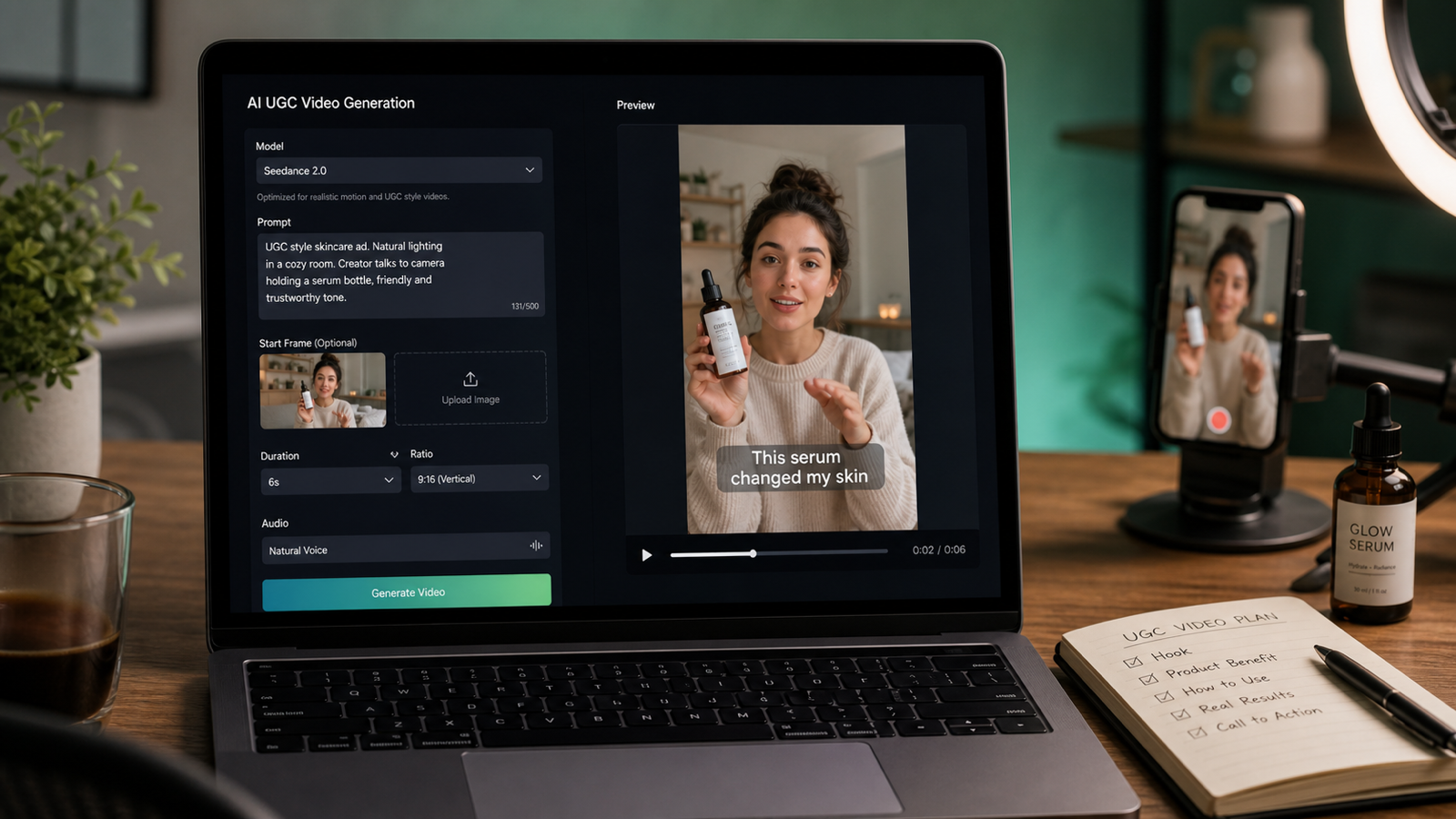
當你想在瀏覽器中同時測試 SeaImagine AI 上的 Seedance 2.0 與其他視覺 AI 模型時,SeaImagine AI 是一個很實用的工作流程。先從選擇正確的輸入類型開始:文字用於新概念、圖片用於產品照或起始畫面、影片則在需要動作參考時使用。
使用以下流程:
- 開啟 SeaImagine AI 的 Seedance 2.0 模型頁。
- 選擇 Seedance 2.0 作為模型。
- 依你的起始素材選擇文字、圖片或影片輸入。
- 當一致性很重要時,上傳產品圖片、包裝照、起始畫面或創作者參考。
- 撰寫以「場景」為核心的 UGC 提示詞,包含創作者人設、場景、開場鉤子、產品動作、證據時刻、鏡頭、氛圍、音訊與 CTA。
- 依平台與活動概念選擇時長、比例、解析度與音訊方向。
- 生成片段後,預覽產品可見度、創作者行為、鏡頭運動、宣稱風險與可剪輯性。
- 每次只微調一個變因:鉤子、產品動作、場景、鏡頭移動、證據時刻或 CTA。
這個 Seedance 2.0 短影片工作流程 在每個提示詞都描述「可見的廣告場景」時更好掌控。不要只要求「一支很棒的 UGC 廣告」,而要描述前兩秒、產品示範、證據時刻與結尾動作。

可重複使用的 Seedance 2.0 UGC 廣告提示詞公式指南
一份強的 UGC 廣告 Seedance 2.0 提示詞指南 應該聽起來像一份簡短的創作者簡報。它需要定義創作者人設、環境、鉤子、產品動作、鏡頭行為、證據時刻、氛圍、音訊與 CTA。
複製這個公式:
Create a 9:16 UGC-style video for [product/service].
A [creator persona] films in [realistic setting] with casual handheld phone-camera energy.
Hook: "[first 2-second hook]."
Show [product action/demo/tutorial] clearly.
Emphasize [main benefit] without exaggerated claims.
Add a believable proof moment: [texture, size, use case, comparison, routine, result].
Camera: close-up product shots, quick but readable cuts, natural motion, stable subject.
Mood: authentic, conversational, social-native.
Audio: [natural voiceover / ambient sound / soft music / product sound].
End with [CTA].
Duration: [8-15 seconds].
最重要的部分是鉤子、示範、證據與 CTA。鉤子讓觀眾有停下來的理由。示範呈現產品如何被使用。證據時刻讓場景更可信,又不必依賴高風險宣稱。CTA 告訴觀眾下一步要做什麼。

12 個可直接複製使用的 Seedance 2.0 UGC 影片提示詞
用這些 AI UGC 影片提示詞範例 作為 SeaImagine AI 產品影片概念的起點。生成前請調整產品細節、創作者人設、證據時刻、CTA 與比例。
1. 維他命 C 精華液
Create a 9:16 UGC-style video for a vitamin C serum. A skincare creator films in a bathroom with soft morning light. Hook: "I wanted something simple for dull skin." Show the dropper, texture on the hand, and gentle face application. Keep the tone natural and realistic. End with: "Add it to your morning routine."
最適合想要柔和晨間保養流程感的保養品牌。除非有充分佐證,否則避免強烈的膚況改變宣稱。
2. 便攜式果汁機
Create a vertical UGC video for a portable blender. A creator films on a kitchen counter, adds fruit, milk, and ice, blends quickly, then pours the smoothie into a glass. Hook: "This is my fastest breakfast trick." Use handheld phone footage, quick close-ups, natural daylight, and a friendly creator reaction.
最適合動作直觀、易於理解的快速產品示範。
3. 無線麥克風
Generate a Seedance 2.0 UGC ad for a wireless microphone. A creator records at a desk and clips the mic onto their shirt. Hook: "Your phone audio might be ruining your videos." Show a simple before-and-after audio moment. Keep the camera casual, close, and realistic.
最適合創作者工具、Podcast 配件與 AI 創作者廣告影片提示詞。
4. 桌面收納架
Create a TikTok-style UGC video for a desk organizer. Start with a messy desk, then show the creator sorting pens, cables, and notes into the organizer. Hook: "My desk finally stopped stressing me out." Use satisfying quick cuts, natural room lighting, and a clean final reveal.
最適合辦公產品、效率內容與小型電商品牌。
5. 旅行背包
Generate a UGC video for a travel backpack. A creator packs clothes, a laptop, charger, bottle, and small pouch into the bag. Hook: "I packed three days into one backpack." Show each compartment clearly, with handheld camera movement and a final mirror shot.
最適合需要呈現隔層與尺寸比例的實用功能示範。
6. 寵物梳毛刷
Create a short UGC ad for a pet grooming brush. A pet owner sits on the floor brushing a calm dog. Hook: "If your sofa is covered in fur, try this." Show gentle brushing, collected loose hair, and a happy pet moment. Avoid medical claims. Keep the scene warm and natural.
最適合需要溫馨居家場景與可見產品動作的寵物用品。
7. 手機支架
Generate a product demo UGC video for a phone stand. A student creator places the phone stand beside a laptop, adjusts the angle, and uses it for a video call. Hook: "Tiny desk upgrade, huge difference." Use close-up product shots and a casual study-room mood.
最適合桌面配件,以及可在單一場景完成示範的 SeaImagine AI 產品影片提示詞。
8. 咖啡訂閱
Create a creator-style UGC video for a coffee subscription. A creator opens the package, smells the beans, brews coffee, and takes the first sip. Hook: "This made my Monday feel expensive." Use cozy kitchen lighting, product packaging close-ups, and a relaxed morning vibe.
最適合有感官細節的生活風格品牌與訂閱制產品。
9. 記帳/預算規劃筆記本
Generate a UGC ad for a budget planner notebook. A creator sits at a cafe table with coffee and fills out monthly spending categories. Hook: "I needed a simpler way to track money." Show pen-on-paper close-ups, page flips, and a calm lifestyle mood.
最適合文具、規劃類產品與財務健康內容。避免暗示產品能保證達成財務成果。
10. 便攜式 LED 小燈
Create a vertical UGC video for a portable LED lamp. A creator reads in bed, turns on the lamp, adjusts brightness, and places it beside the book. Hook: "This little lamp fixed my night routine." Use warm lighting, soft shadows, and a cozy bedroom scene.
最適合以光線、氛圍與使用動作作為賣點的居家產品。
11. 健身水壺
Generate a UGC-style product video for a fitness water bottle. A creator packs it into a gym bag, drinks after a workout, and shows the straw lid. Hook: "This is the bottle I actually remember to bring." Keep the pacing energetic but believable.
最適合健身配件與短版創作者式廣告概念。
12. AI 寫作工具
Create a Seedance 2.0 UGC video for an AI writing tool. A creator sits at a laptop with a blank document, types a short idea, then reacts to a clean draft outline. Hook: "When your brain has zero ideas..." Avoid readable fake UI text. Keep it realistic, casual, and creator-friendly.
最適合軟體產品:呈現使用者痛點,而不是偽造可讀的細節介面文字。
這些 AI 工具的 UGC 影片提示詞 在產品動作清楚時效果最好。若場景需要多個角度或多個賣點,請生成多支短片段,再把最強的瞬間剪輯整合。

UGC 產品廣告:Text-to-Video vs Image-to-Video
當你想用文字測試全新的創作者場景時,使用 AI UGC 影片生成器 工作流程。文字提示詞適合在你還沒有最終產品素材前,用來探索鉤子、場景、創作者人設、見證式概念,以及 AI UGC 廣告影片工作流程 的變體。
當產品照片、包裝、Logo 位置或第一幀需要保持可辨識時,使用 圖片轉影片 AI 生成器 工作流程。這對 產品圖片轉 UGC 影片 概念、AI 圖轉影產品示範 測試與起始幀產品場景特別有用。
對於圖片工作流程,撰寫提示詞時要把「穩定物件」與「動作」分開。例如:「保持手機支架外型一致。一位學生把它放在筆電旁,調整角度,然後開始視訊通話。手持特寫、自然自習室光線、友善旁白。」這會同時給模型視覺錨點與 UGC 動作。
如果你想 把產品照片變成影片,請從乾淨的產品圖開始,並要求一個簡單示範。如果你想做 圖片轉 TikTok 廣告影片,請保持直式、以創作者為主導且易於後製剪輯。

如何精修 Seedance 2.0 的 UGC 提示詞
精修是讓多數 Seedance 2.0 創作者影片提示詞 變得更可用的關鍵。如果第一次輸出看起來很假,請先簡化場景再逐步加細節。
可用以下修正方式:
- 若產品外型變形,上傳更清晰的產品圖片或起始幀。
- 若創作者動作不清楚,把提示詞縮減到一個示範:打開、倒出、塗抹、夾上、收納、調整、梳毛、書寫或揭曉。
- 若鉤子太通用,讓它更具情境:「我把三天行李塞進一個背包」比「這包很好」更有力。
- 若鏡頭過於精緻,要求隨手手持手機鏡頭感,以及清楚可讀的近距離特寫。
- 若影片太忙,移除多餘道具、地點或換景。
- 若產品宣稱風險高,用可見的證據時刻替代,例如質地、尺寸、流程、設定或使用情境。
- 若出現假的 UI 文字,要求不要出現可讀的介面文字,字幕可在剪輯軟體中後加。
目標不是把提示詞寫得更長,而是把廣告寫得更清楚:鉤子、產品動作、證據時刻、創作者反應與 CTA。

發布 AI 生成 UGC 廣告前的檢查清單
AI 生成的 UGC 應被視為創意草稿或廣告概念素材。在發布、交付客戶或投放付費媒體前,請審核最終素材的權利、宣稱與平台規範。
請檢查以下項目:
- 產品宣稱:確認每個效益、對比、結果、見證與示範都正確且可佐證。
- 商業使用權:檢視 SeaImagine AI 條款、方案限制、模型使用規則與來源素材權限。
- 音樂與音訊權利:付費使用前確認旁白、音效、上傳音訊與音樂授權。
- 平台廣告規範:檢查 TikTok、Instagram、YouTube、Meta、市集與廣告聯播網政策。
- 揭露要求:遵循相關的廣告揭露、贊助內容、合成媒體與網紅式背書規範。
- 隱私設定:保護未公開產品、客戶素材、私密參考與內部測試。
- 品牌安全:檢查臉部、手部、背景物件、包裝、可見文字、Logo 與非預期宣稱。
對於 SeaImagine AI 短影片生成器 的工作流程,這個提醒特別重要,因為 UGC 廣告可能看起來已可直接發布,但仍需要合規審查。好的 AI 草稿很有用,但不能取代權利檢查、產品審核與最終剪輯。

SeaImagine AI 與 Seedance 2.0 工作流程推薦文章
當你想比較模型、改善提示詞,或建立更完整的 SeaImagine AI 工作流程(文字轉影片、圖片轉影片、UGC 產品廣告)時,可參考以下文章。
相關文章:
- Seedance 2.0 AI Video Generator: UGC Prompt Guide for SeaImagine AI
- How to Use Seedance 2.0 on SeaImagine AI to Make Better Short Videos
- SeaImagine AI Text-to-Video Guide: How to Choose Models and Create Better Clips
- The 2026 Image-to-Video Guide for Sea Imagine AI: Best Models & Prompts
- Kling 3.0 Review: Is It the Best AI Video Generator Yet in 2026?
- How to Use Grok Imagine AI Video Model on SeaImagine AI
大家也會看:
- UGC Prompts for Seedance 2: How to Create Native AI Video Ads
- How to Use Seedance 2 to Create AI UGC Ads That Actually Feel Native
- Seedance 2.0 for TikTok Videos: How Creators Can Turn Ideas Into Scroll-Stopping Clips
- Seedance 2.0 Video Generation Guide: Tutorial + Prompts
- Seedance 2.0 Prompt Tips for More Human, Realistic AI Video
- Seedance 2.0 Video Generation Guide: How to Get Controlled, Consistent Results

FAQ:SeaImagine AI 上的 Seedance 2.0 UGC 提示詞
一個 Seedance 2.0 UGC 提示詞應包含什麼?
好的提示詞應包含產品或服務、創作者人設、場景、前兩秒鉤子、產品動作、證據時刻、鏡頭運動、氛圍、音訊方向、CTA、時長與畫面比例。
做 UGC 廣告應該用文字轉影片還是圖片轉影片?
當你要從零探索新的創作者場景時,用文字轉影片。當產品外觀、包裝或第一幀一致性很重要時,使用 start frame UGC video generator 或圖片轉影片工作流程。
SeaImagine AI 能幫忙做產品示範影片嗎?
SeaImagine AI 可透過文字轉影片與圖片轉影片工作流程支援產品示範概念。請把輸出當作草稿,發布前再確認產品準確性、宣稱、權利與平台規範。
UGC 提示詞影片應該多長?
對短版創作者式廣告來說,8 到 15 秒是實用範圍,因為能容納鉤子、示範、證據時刻與 CTA,又不會讓場景過載。
如何避免不真實的 AI UGC 結果?
使用一個產品動作、一個場景、自然的手機手持運鏡、清楚可見的特寫,以及保守的宣稱。如果結果太精緻或太混亂,請簡化提示詞並重新生成。

結論:建立可重複的 SeaImagine AI UGC 影片工作流程
當你提供清楚的場景(創作者、場景、鉤子、產品動作、證據時刻、鏡頭風格、音訊與 CTA)時,Seedance 2.0 AI 影片生成器 在 UGC 影片創作上最有價值。SeaImagine AI 讓創作者、行銷人員、電商賣家、代理商與小型品牌能用簡單的瀏覽器工作流程,以文字、圖片與視覺輸入方式測試 Seedance 2.0。
從一個產品點子開始,寫一段簡短的創作者式場景,生成草稿,並依預覽呈現的結果精修。這套可重複的流程比追求第一次就完美的輸出更可靠,也能讓最終審核聚焦在產品準確性、權利、平台規範、揭露與品牌安全。