AI video in 2026 is finally at the point where you can get something that feels like a real shot—camera intention, believable motion, and a coherent scene—without spending half your day fighting the model. But “best” is a tricky word.
If you’re here because you want a simple answer—is Kling 3.0 the best AI video generator in 2026?—the honest answer is: it depends on what you’re making. The “best” model for a cinematic short isn’t always the “best” model for product UGC, and the one that nails motion realism might still struggle with identity consistency.
So this review is built around a viewer-first approach: what you should look for, how to test it quickly, where Kling 3.0 tends to shine (and where it can stumble), and how to get reliable results with a practical workflow—especially if you want a faster way to iterate using SeaImagine Text to Video or lock a specific look with SeaImagine Image to Video.
What “best” means in 2026 (and why it’s not one thing)
In 2026, the top models are close enough that “best” comes down to your priorities:
- Directability: When you ask for a slow dolly-in and soft morning light, does it actually obey?
- Motion realism: Do feet plant? Do objects have weight? Does the physics feel natural?
- Coherence: Does the scene stay stable over 5–10 seconds, or does it drift into a different world?
- Identity consistency: Does your character or product remain recognizable across frames?
- Speed + iteration cost: Can you iterate fast enough to find the good takes?
- Audio workflow: If audio is available in your platform, does it align cleanly with the visuals?
Kling 3.0 is often discussed as a model aiming at that “cinematic realism + control” sweet spot. The real question isn’t whether it can generate a pretty clip. The question is whether it can do it repeatably, with less prompt wrestling, and with fewer weird surprises.
Quick verdict (for skimmers)
If your priority is cinematic motion and “real camera” energy, Kling 3.0 is the kind of model that can feel like a step up—especially in shots where the camera move matters as much as the subject.
If your priority is rapid iteration for ads, UGC, or social content, the best approach is often a two-lane workflow:
- Use Kling 3.0 for the shots that need maximum realism or signature motion.
- Use a fast iteration tool like SeaImagine’s text-to-video generator to prototype prompts quickly, then bring the winning prompt structure back into Kling 3.0.
And if you need a specific look to stay stable (product hero shot, consistent character face, brand scene), starting from a strong reference frame with SeaImagine’s image-to-video tool is often the fastest way to avoid “identity drift.”
How I recommend you test Kling 3.0 (in under 30 minutes)
A good review isn’t “I liked it.” A good review gives you a repeatable test pack.
Here’s a simple 6-test method you can run in one sitting:
Test 1: Motion realism (human walk)
Goal: foot contact, body weight, no sliding.
Prompt idea:
A person walking toward the camera on a quiet street, natural stride, shallow depth of field, soft afternoon light, handheld documentary feel.
Test 2: Object interaction (hands + product)
Goal: realistic handling, stable object shape.
Prompt idea:
Close-up hands opening a premium skincare bottle, gentle motion, realistic reflections, clean studio lighting.
Test 3: Camera control (dolly + focus)
Goal: camera direction stays coherent.
Prompt idea:
Slow dolly-in toward a subject sitting by a window, rack focus from foreground to face, cinematic natural light.
Test 4: Complex scene (crowd / motion / background)
Goal: scene coherence, no melting background.
Prompt idea:
Busy night market, people passing, colorful signs, steam rising, camera panning slowly, realistic motion blur.
Test 5: Style lock (consistent aesthetic)
Goal: holds an art direction without drifting.
Prompt idea:
High-end fashion editorial, minimal set, bold shadows, clean composition, film grain look.
Test 6: Identity stability (same subject)
Goal: subject remains the same through the full clip.
Prompt idea:
A specific person sits, smiles, turns slightly, maintains the same appearance, stable facial features, consistent hair and clothing.
Why this matters: If Kling 3.0 passes these six tests cleanly, it’s “best-tier” for most real projects. If it fails in one area, you’ll know exactly what to compensate for.
If you want to move fast, run the same prompt pack in SeaImagine Text to Video first—get your phrasing right—then reuse the best-performing prompt structure in Kling 3.0.
Kling 3.0 motion & physics: where it feels strong
The biggest difference viewers notice in AI video isn’t resolution. It’s motion credibility.
When a model is good at motion, you see it in:
- Weight and timing: movements feel paced like real muscles and gravity.
- Contact realism: feet plant instead of sliding; objects don’t “float.”
- Material response: hair and fabric move like they have mass.
Kling 3.0 tends to feel most convincing in shots that resemble real cinematography: medium shots, controlled camera movement, a clear subject, and lighting that makes sense.
Where motion can still break
Even strong models can glitch when you stack too many constraints:
- fast action + close-up hands + complicated lighting + crowded background
- heavy camera motion + extreme lens effects + complex facial expressions
The best practice is to pick a priority: motion realism or micro-detail or complex choreography. When you ask for everything at once, you get “AI soup.”
If your project is product-focused, one reliable approach is to animate a clean keyframe first with SeaImagine Image to Video (stable product geometry), then attempt the more cinematic version in Kling 3.0.
Prompt adherence & “directability” (the thing creators actually care about)
A video model can be gorgeous and still be frustrating if it doesn’t follow direction.
With Kling 3.0, the most important trick is to prompt like a director, not like a novelist.
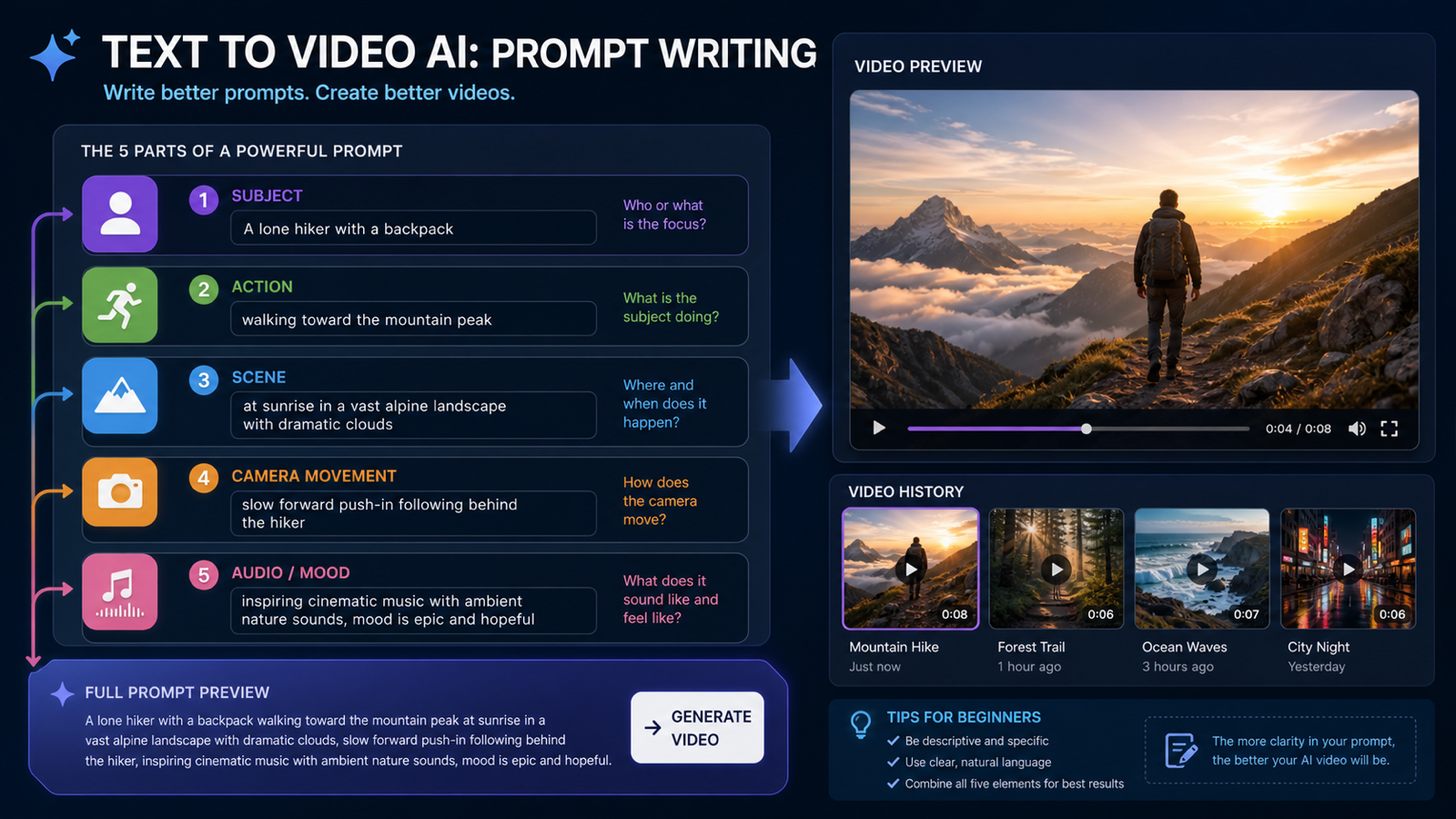
A prompt structure that works in 2026
Use a consistent order:
- Subject (who/what)
- Action (what happens)
- Environment (where)
- Camera (move + framing)
- Lighting (time of day, softness)
- Style (cinematic / documentary / commercial)
- Constraints (avoid text, avoid distortions, stable identity)
Example:
Premium watch on a wrist, the hand turns slowly to catch light, minimal studio background, slow orbiting camera, softbox reflections, luxury commercial style, stable shape, no warped fingers, no text.
If you want to iterate fast, you can workshop this structure in SeaImagine’s Text to Video tool—change one variable at a time (camera, lighting, action) until it “clicks.”
Consistency: characters, products, and the “identity drift” problem
Identity drift is still the thing that separates “cool demo” from “usable production.”
What often causes drift
- Overly long prompts with too many adjectives
- Re-describing the subject differently in the same prompt
- Competing style cues (“hyper-real” + “anime” + “oil painting”)
- Busy scenes where the model keeps “rewriting” the subject
How to reduce it
- Keep the subject description short and stable.
- Put the camera and action after the subject.
- Prefer one dominant style cue.
- Use fewer scene elements per shot.
If you absolutely need the subject to stay consistent, start from a controlled reference image and animate it with SeaImagine Image to Video. That workflow is especially useful for:
- a consistent spokesperson
- a branded product hero shot
- a specific fashion look
- a character that must remain recognizable
Cinematic quality: camera moves that feel like real shots
In 2026, “cinematic” isn’t just color grading. It’s shot language.
Here are camera moves that tend to reveal model quality quickly:
- Slow dolly-in: Does the subject stay stable, or does the face warp?
- Orbit shot: Does the background remain coherent as the angle changes?
- Handheld micro-shake: Does it feel natural or like random jitter?
- Rack focus: Does focus shift smoothly without melting details?
When Kling 3.0 is in a good mood, it can produce camera motion that feels intentionally directed rather than algorithmic.
If your platform allows multiple variations, run 3–6 takes. AI video still has a “best take” phenomenon.
For fast exploration of shot language, try a mini prompt pack in SeaImagine text-to-video, then reserve Kling 3.0 for the shot that needs the highest realism.
Audio in 2026: what to expect (without promising the impossible)
Some platforms offer native audio generation or audio conditioning; some don’t.
If your Kling 3.0 interface includes an audio option, test it like this:
- Keep dialogue short (one sentence).
- Use a stable close-up (no fast turns).
- Avoid background crowds.
- Add clear intent: “calm voice,” “soft room tone,” “minimal reverb.”
If audio isn’t available (or isn’t reliable), the best practice is:
- generate clean visuals
- add VO + SFX in post
A surprisingly effective workflow for ads is to generate silent product visuals from a keyframe using SeaImagine Image to Video, then add voiceover and captions afterward.
Best use cases for Kling 3.0 (with ready-to-use prompts)
Below are mini prompt packs designed to be copy-paste friendly. Adjust duration and aspect ratio based on your platform.
Use case 1: Cinematic B-roll (travel / lifestyle)
-
Sunrise over a coastal cliff, slow drone-like push forward, misty air, soft golden light, cinematic realism, stable horizon.
-
Coffee being poured into a ceramic cup, close-up macro, slow motion feel, warm kitchen light, commercial cinematic style.
-
City street at night in rain, reflections on pavement, slow handheld walk, neon glow, realistic motion blur.
Use case 2: Product UGC ad (clean and brand-ready)
-
Hands unboxing a premium gadget on a clean table, natural daylight, minimal background, steady camera, realistic reflections, no warped fingers.
-
Skincare bottle rotating slowly on a marble surface, soft studio lighting, luxury commercial shot, stable label area, no text.
-
A person applies a face cream, close-up, gentle motion, clean bathroom light, realistic skin texture, no distortion.
Use case 3: Character-driven short clip
-
Close-up portrait, subject smiles subtly and looks away, soft window light, film look, stable facial features, minimal motion.
-
Medium shot, subject walking through a hallway, slow dolly backward, cinematic lighting, consistent outfit, no drifting identity.
Use case 4: “One shot story” (simple narrative)
-
A letter slides across a wooden desk, a hand picks it up, camera slowly pushes in, warm lamp light, grounded realism.
-
A door opens to reveal bright daylight, camera moves forward into the room, gentle dust particles, cinematic realism.
If you want to iterate these quickly to find the strongest phrasing, run them through SeaImagine Text to Video first, then bring the best version into Kling 3.0.
Common Kling-style failures (and how to fix them)
1) “The hands got weird”
Why it happens: close-up + complex manipulation + fast motion.
Fixes:
- pull back to a medium shot
- slow the action
- reduce finger detail in the prompt (“hands open the box” instead of “fingers peel the seal”)
2) “The character changed mid-clip”
Why it happens: too many descriptors or a busy background.
Fixes:
- shorten subject description
- simplify scene
- reduce camera movement
- start from a reference frame using SeaImagine Image to Video
3) “The scene melts when the camera moves”
Why it happens: the model can’t maintain geometry under motion.
Fixes:
- use slower, simpler camera instructions
- avoid extreme lens effects
- pick one camera move per shot
4) “Text/logos look wrong”
Even in 2026, tiny text is not reliable.
Fixes:
- avoid asking the model to render legible text
- add branding in post
How to use SeaImagine alongside Kling 3.0 (the practical workflow)
You don’t have to pick one model forever. The winning strategy is usually a pipeline.
Workflow A: Prompt prototyping (fast iterations)
Use SeaImagine Text to Video when you want speed:
- Set your ratio and duration.
- Paste a structured prompt.
- Generate multiple variations.
- Refine one variable at a time (camera, lighting, action).
- Take the best prompt structure into Kling 3.0 for the “hero” render.
Why it works: you stop wasting expensive runs on prompts that aren’t ready.
Workflow B: Reference-first consistency (stable look)
Use SeaImagine Image to Video when you need stability:
- Pick a strong start frame (clear subject, clean composition).
- Describe motion and camera rather than re-describing every visual detail.
- Keep changes small between iterations.
- Export the best clip and use it as a benchmark for what “stable” should look like.
Why it works: you reduce identity drift and protect product geometry.
Workflow C: Hybrid “ad production” lane
- Use image-to-video for product hero shots
- Use text-to-video for lifestyle variations
- Use Kling 3.0 for your most cinematic shot (the one you’d put first in the edit)
Is Kling 3.0 the best AI video generator in 2026?
If your definition of “best” is cinematic motion + camera intention + realism, Kling 3.0 is a strong contender.
But if your definition of “best” is fast iteration and reliable consistency, your best results often come from combining tools:
- Prototype quickly with SeaImagine’s Text to Video tool.
- Lock the look with SeaImagine Image to Video when consistency matters.
- Use Kling 3.0 for the shots that need the “premium” feel.
The real win in 2026 isn’t finding one perfect model. It’s building a workflow that gets you to finished videos faster—with fewer reruns, fewer artifacts, and more shots that actually match your intent.
Quick checklist: get better results on your next run
- Write prompts like a director: subject → action → camera → lighting → style → constraints
- Keep one shot simple; do complex stories in the edit
- Generate multiple variations; pick the best take
- Protect consistency with reference frames when needed
- Add text/logos in post, not inside the generation prompt
If you want to start right now, pick one prompt from the prompt packs above and run it in SeaImagine Text to Video, then try the same prompt in Kling 3.0 and compare: motion, coherence, and how closely it follows direction.