If you’ve used AI image tools for more than a few minutes, you’ve probably noticed something important: generating a new image from scratch is fun, but editing an image without breaking it is the real test.
That’s why image-to-image matters so much. It sits much closer to real creative work. Instead of hoping a model guesses your idea from zero, you start with a base image that already has the right subject, composition, or product framing. Then you ask the model to improve it, restyle it, or selectively change it.
That’s also why an analysis of Seedream 5.0 AI image-to-image matters more than a generic “is this model good?” review. The real question is not whether the first output looks impressive. The real question is whether the workflow helps you reach a usable final image with less friction.
In this guide, we’ll break down what a good Seedream-style image-to-image workflow should do, how to test it properly, where it usually fails, and why a practical alternative like Sea Imagine AI image-to-image is worth trying if you want a hands-on tool today.
Why image-to-image matters more than text-to-image in real workflows
Text-to-image is great for ideation. It’s useful when you want to explore broad directions, concepts, and styles. But once you care about consistency, revision control, and precision, image-to-image becomes much more valuable.
Here’s why:
- You can keep a subject recognizable across versions.
- You can preserve layout while changing only one element.
- You can turn one strong draft into a whole family of usable variations.
- You can treat AI like an editing assistant instead of a slot machine.
That shift matters for almost every real use case:
- character consistency
- product image iteration
- background replacement
- style transfer
- social creative refreshes
- campaign updates without rebuilding everything
So when people talk about Seedream 5.0 AI image-to-image, they’re usually not looking for a magical effect. They’re looking for a workflow that lets them make controlled changes without starting over.
What image-to-image with Seedream 5.0 AI is supposed to do
In an ideal world, a strong Seedream-style image-to-image system should do four things well.
1) Keep identity stable
If you upload a portrait, the face should stay recognizable. If you upload a product, its silhouette should remain intact. If you upload a designed scene, the layout should not randomly collapse.
2) Change only what you ask it to change
If your prompt says “change only the background,” the subject should not come back with a different face, outfit, pose, or lighting direction unless you asked for it.
3) Preserve composition when needed
A lot of image-to-image work is really composition preservation. You like the framing. You like the camera angle. You just want a cleaner background, a different style, or a new mood.
4) Support prompt-based refinement
A good workflow should reward better instructions. In other words, prompt quality should improve the result, not feel irrelevant.
That’s the real promise behind a Seedream 5.0 image editing workflow: fewer rerolls, more usable edits, and more confidence that your next revision will move in the right direction.
The core strengths worth analyzing in any Seedream 5.0 AI image-to-image workflow
If you want to judge a tool fairly, don’t ask only whether the image looks “beautiful.” Ask whether it performs well in the places where image-to-image usually breaks.
Identity preservation
This is one of the most important tests.
Can the tool keep:
- the same face
- the same hairstyle
- the same product shape
- the same character outfit
- the same silhouette
A model can create a gorgeous single result and still fail as an editing tool if identity drifts every time you touch the prompt.
Local editing control
This is where frustration usually appears.
The best systems let you say:
- “replace the background only”
- “change the lighting only”
- “swap the object in the hand”
- “make the jacket black instead of red”
without also rewriting the whole image.
Style transfer and consistency
A strong AI image transformation system should restyle an image without destroying what makes it recognizable. That includes:
- changing a photo into an illustration
- turning a realistic scene into editorial art
- shifting palette and mood
- applying a different rendering style while keeping the structure stable
Prompt responsiveness
This sounds simple, but it matters a lot.
Does the tool actually respond to prompts like:
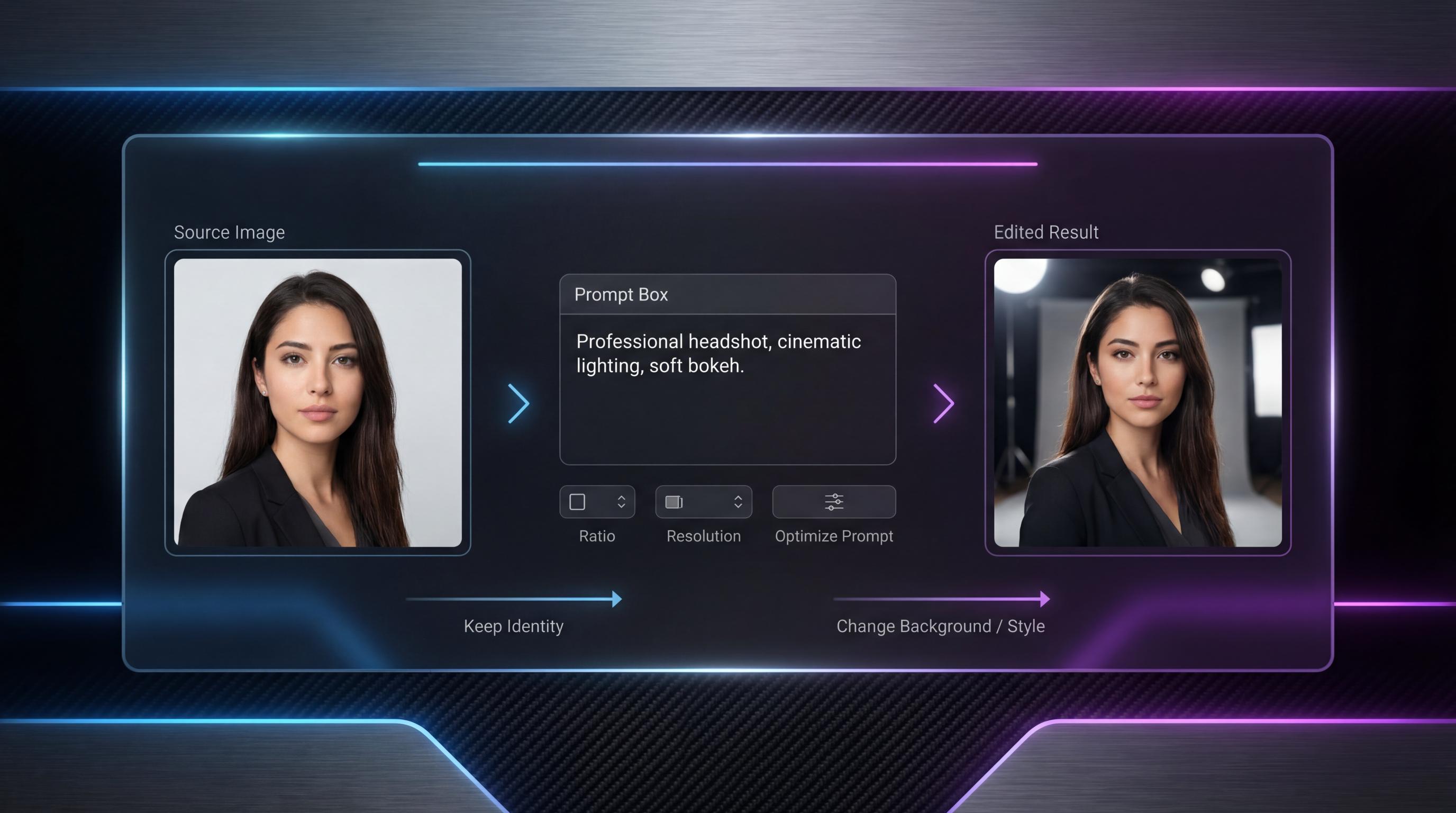
Keep the subject identity and composition unchanged. Change only the background to a soft studio gradient. Do not add extra objects.
If the answer is yes, the system becomes useful. If the answer is “sometimes,” then the workflow becomes expensive and unpredictable.
A simple testing framework for Seedream 5.0 AI image-to-image
If you want a useful evaluation, use a repeatable benchmark instead of vibes.
Step 1: Start with one strong base image
Pick an image that already has something worth preserving:
- a clean portrait
- a product photo
- a fashion shot
- a character concept image
Step 2: Run one structure-preserving edit
Prompt example:
Keep the subject identity and composition unchanged. Change only the background to a clean light-gray gradient. Do not add new props.
Step 3: Run one style-transfer edit
Prompt example:
Keep the same pose and composition, but restyle the image as a refined editorial illustration with soft ink textures and muted colors.
Step 4: Run one background replacement
Prompt example:
Keep the subject unchanged. Replace the current background with a neon city street at night. Preserve the same framing.
Step 5: Score the results
Use four practical criteria:
- instruction accuracy
- consistency
- edit cleanliness
- final usability
That last category matters most. You’re not judging which image is prettiest in theory. You’re judging which result is closest to something you would actually publish.
Prompt structure that works better for image-to-image
A lot of failed image-to-image prompts are too vague. They say what the user wants changed, but not what needs to remain stable.
A stronger format has three parts:
1) What must stay the same
Examples:
- keep the subject identity unchanged
- preserve the composition
- maintain the same camera angle
- keep the product centered
2) What should change
Examples:
- change the background to a minimalist studio setting
- change the lighting to soft golden-hour light
- restyle as a watercolor illustration
3) What must be avoided
Examples:
- do not add extra text
- do not change the pose
- no new props
- no busy background clutter
Bad prompt vs improved prompt
Bad:
make it more stylish
Improved:
Keep the subject identity and framing unchanged. Change the style to a premium fashion editorial look with soft contrast and muted beige tones. Do not add extra objects or text.
That small shift often makes a huge difference in any AI image transformation workflow.
Common image-to-image use cases worth analyzing
Character consistency
This is one of the most common reasons people use image-to-image.
You already have one portrait or concept image you like. Now you want to change:
- the outfit
- the environment
- the expression tone
- the visual style
without losing the character.
Product image iteration
This is where image-to-image becomes especially valuable for ecommerce and marketing.
You can keep the same product shot and test:
- cleaner backgrounds
- better lighting
- seasonal themes
- alternate ad styles
without needing a full new photoshoot.
Style transfer
A single base image can become:
- an illustration
- a cinematic concept image
- a magazine-style visual
- a painterly composition
The real question is whether the transformation feels controlled or chaotic.
Social and marketing refreshes
A campaign image often doesn’t need to be rebuilt. It just needs a new background, a new seasonal mood, or a slightly different aesthetic direction.
That’s why so many users end up wanting a hands-on Sea Imagine AI image editor alternative after reading about model capabilities in the abstract.
Where image-to-image usually breaks
This is where reality matters.
Subject drift
The face changes. The product shape shifts. The pose subtly moves. This is one of the biggest frustrations in revision-heavy workflows.
Fix: explicitly lock identity and reduce edit scope.
Over-editing
You ask for one change and the whole scene gets rebuilt.
Fix: split one large change into two smaller passes.
Background contamination
When replacing a background, the model may contaminate edges, merge subject details with the new environment, or introduce clutter.
Fix: use cleaner base images and ask for minimal environments first.
Too many instructions in one step
If you try to change outfit, lighting, background, and rendering style all at once, you increase the chance of drift.
Fix: stack edits gradually.
Text degradation
Text often gets worse after multiple revisions.
Fix: keep text minimal, add exact text only when necessary, and consider handling typography separately in a design tool.
What a real image-to-image tool interface should include
A useful image-to-image workflow is not just about model quality. The interface matters too.
A real tool should include:
- a model switcher
- a clean upload zone
- a prompt box
- translate or optimize prompt support
- aspect ratio selector
- resolution selector
- public/private toggle
- visible credit usage
That’s one reason Sea Imagine AI’s image-to-image generator stands out as a practical alternative. Its interface already exposes the controls people actually need for real image transformation work: image upload, prompt entry, translate/optimize options, ratio, resolution, visibility settings, and generation controls.
Instead of talking about image-to-image as a theory, you can actually test it in a live workflow using the image-to-image generator on Sea Imagine AI.
Alternative recommendation: try Sea Imagine AI for practical image-to-image work
If your goal is not just to read about image-to-image but to actually use it, Sea Imagine AI image-to-image is a strong place to start.
Its current image-to-image page shows a working creative workflow built around Nano Banana Pro, with:
- image upload
- prompt input
- translate toggle
- optimize prompt helper
- ratio settings
- resolution options
- public/private visibility
- clear generation controls
That means readers can move directly from theory to hands-on testing.
And that’s important, because the fastest way to understand image-to-image is not reading five model pages. It’s running the same base image through a few real prompts and seeing where the tool holds up.
Other Sea Imagine AI tools worth recommending at the end
Once readers understand image-to-image, it helps to point them toward adjacent tools that match real workflows.
For quick visual drafts
Use the AI image generator on Sea Imagine AI when you want to create a fresh concept before moving into edits.
For text-first image creation
The text-to-image generator is the natural next step when users want to build a brand-new visual and then refine it later with image-to-image.
For turning a still into motion
The image to video AI tool is useful when the best image-to-image result becomes the base frame for a short animated clip.
For script-first creation
The text to video AI tool makes sense when the user wants to move beyond still imagery entirely and start from a text concept.
For access and budgeting
It also helps to point readers to Sea Imagine AI pricing so they can check plans, credits, and access differences before committing to a workflow.
Final takeaway
The best way to analyze Seedream 5.0 AI image-to-image is not by asking whether one output looks impressive. It’s by testing three things:
- consistency
- control
- edit stability
If a tool can preserve identity, obey “keep X, change Y” instructions, and get you to a usable final image with less frustration, then it’s doing its job.
And if you want a practical alternative you can test right now, start with Sea Imagine AI image-to-image. From there, you can expand into AI image generation for fresh drafts, text-to-image for concept creation, or image to video AI when you’re ready to turn stills into motion.
That’s when image-to-image stops being a cool demo and starts becoming a real workflow.